MCP vs. CLI: Which One to Choose?
June 19, 2026
Where context and execution belong in AI-enabled workflows
AI agents are changing how systems get work done.
They can retrieve information, trigger workflows, summarize records, generate documents, analyze data, and support decisions across different tools. But the value of an AI agent does not come from the model alone. It comes from what the agent can access, how safely it can act, and how much context it has before it takes the next step.
That is where the MCP versus CLI conversation becomes important.
For years, command-line interfaces, or CLIs, have given developers, IT teams, and operations groups a direct way to run commands, automate tasks, and control technical environments. CLIs are fast, familiar, and powerful. They still matter.
But AI agents introduce a different requirement.
Agents do not only need to execute commands. They need to understand context. They need to know what data matters, what rules apply, which system owns the source of truth, and what action should happen next.
That is where Model Context Protocol, or MCP, enters the conversation.
The question is not whether MCP replaces CLI. It does not. The better question is where each one belongs inside an AI-enabled workflow.
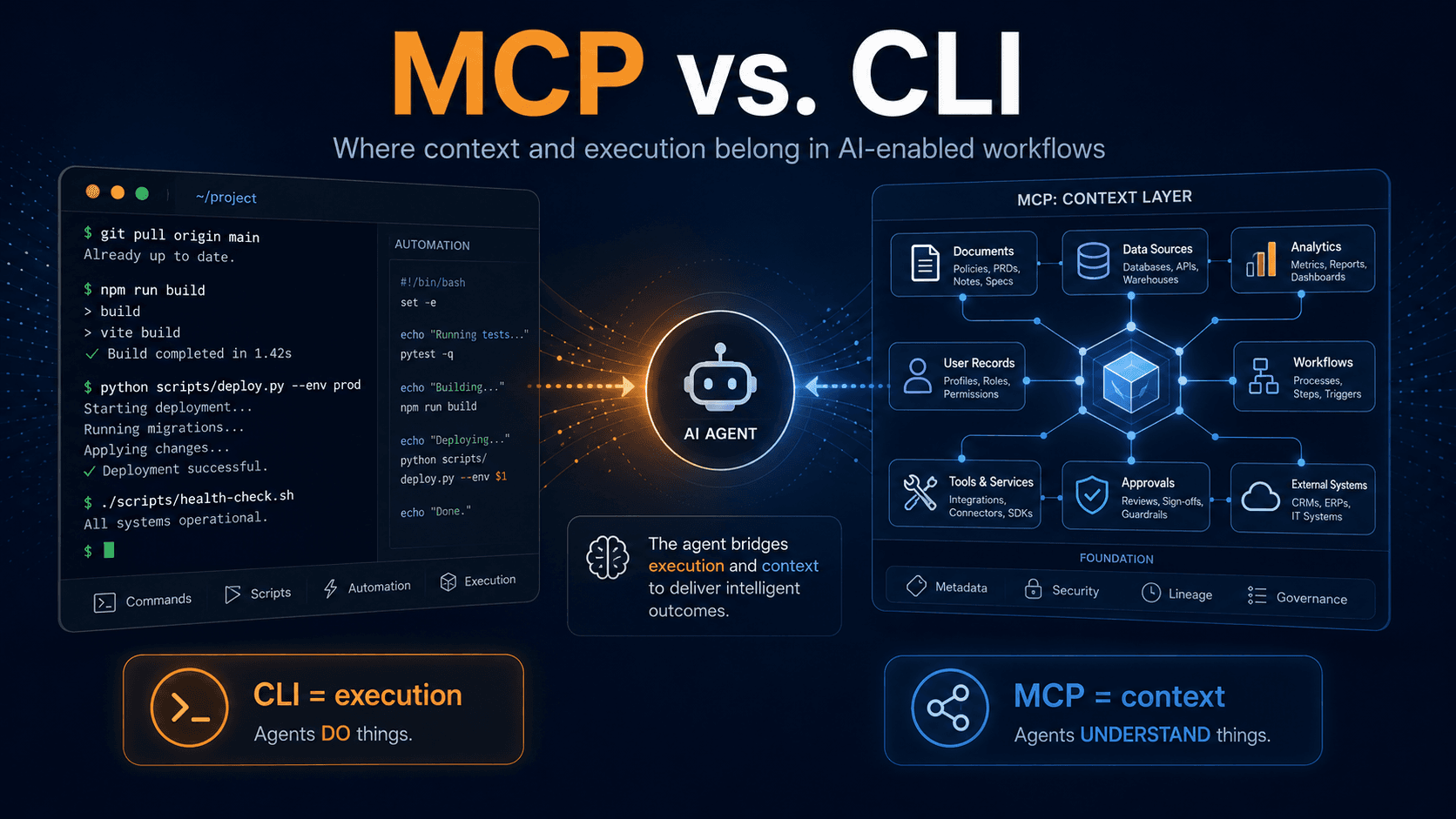
CLI Is Built for Execution
CLI works well when the task is clear.
Run a script. Deploy a service. Pull logs. Trigger a build. Check a status. Move data from one defined place to another.
These are the kinds of tasks where CLI shines.
A CLI is predictable because it follows defined commands. When the command is right, the system performs the action. That makes CLI valuable for automation, DevOps, infrastructure management, testing, and repeatable technical workflows.
For AI agents, CLI can be useful when the agent already knows exactly what needs to happen. If the instruction is specific, the environment is controlled, and the risk is low, CLI gives the agent a direct path to execution.
But that strength is also the limitation.
CLI is good at doing what it is told. It is not designed to explain the business context behind the command.
A command can tell an agent how to act. It does not always tell the agent why the action matters, what else depends on it, or whether the action fits the larger workflow.
AI Agents Need Context Before Action
This is where traditional automation starts to break down.
A script can complete a task and still miss the bigger picture. An agent can retrieve a record and still fail to understand whether that record is current, verified, expired, duplicated, incomplete, or tied to another workflow.
That matters because AI agents are increasingly being used in environments where context is not optional.
A hiring agent may need to understand candidate history, certifications, role requirements, training status, background check progress, and compliance records. A field operations agent may need to understand work orders, safety documentation, technician credentials, site conditions, and customer requirements. A software development agent may need to understand repository structure, testing standards, security rules, pull request history, and technical debt.
CLI can help an agent perform a task inside these environments.
MCP helps the agent understand more of the environment before it acts.
That difference is important.
What MCP Changes
Model Context Protocol provides a standardized way for AI applications to connect with external tools, data sources, and systems. Instead of relying only on isolated commands or one-off integrations, MCP creates a more structured path for agents to discover and use the resources available to them.
In practical terms, MCP helps expose tools, data, and context in a way an AI agent can understand and interact with more consistently.
That does not make MCP a shortcut to perfect automation. The quality of the outcome still depends on the quality of the connected systems, the rules around access, and the structure of the workflow.
But MCP changes the architecture.
It moves the conversation from command execution to contextual interaction.
A CLI-driven agent may execute a command to pull candidate information from a database. An MCP-enabled agent may access candidate information, training records, credential status, compliance requirements, and onboarding progress through a structured connection.
That creates a better foundation for decision support.
The same pattern applies across software development, telecom operations, workforce compliance, training, document management, and field execution.
When an agent has better context, it can support better action.
MCP Still Needs Governance
It is easy to treat MCP as the answer to every AI integration problem. That would be a mistake.
MCP can improve how agents access tools and context, but it still needs governance. Agents need permissions. Data needs structure. Workflows need ownership. Outputs need review. Systems need auditability.
Without those foundations, MCP can simply give agents more access to messy information.
That is not intelligence. That is a larger surface area for confusion.
This is the same principle behind Unify's approach to AI. Intelligence becomes more valuable when it operates inside structured workflows, verified data, role-based access, and clear operational rules. The goal is not just to connect an agent to more systems. The goal is to make those connections useful, safe, and accountable.
More access does not always create better outcomes.
Better context does.
This Is Not Really MCP vs. CLI
The strongest AI environments will not treat MCP and CLI as competing choices.
They solve different problems.
CLI is effective when the task requires direct execution. It is useful for commands, scripts, deployments, testing, file operations, system checks, and technical automation.
MCP is effective when the agent needs structured access to tools, data, and workflow context. It is useful when the agent must reason across systems, retrieve relevant records, understand relationships, and support decisions before taking action.
In simple terms:
- CLI helps agents do.
- MCP helps agents understand.
- Mature AI architecture often needs both.
An agent might use MCP to understand the workflow, retrieve the right information, confirm permissions, and identify the correct next steps. Then it might use a CLI-based process to execute a specific command in a controlled environment.
That is not a contradiction. That is good architecture.
How Organizations Should Choose
The right choice depends on the job the agent needs to perform.
Choose CLI when the workflow is technical, repeatable, and command-driven. CLI is a strong fit when the input is clear, the output is predictable, and the agent does not need much business context to complete the action.
Choose MCP when the workflow depends on context across multiple systems. MCP is a stronger fit when agents need to interact with records, users, approvals, documents, tools, or operational data in a structured way.
Use both when the goal is production-ready AI.
That is where the conversation becomes less about tools and more about operating models. AI agents should not be dropped into disconnected systems and expected to create order. They need structure around them. They need a clear source of truth. They need defined rules for what they can access, what they can change, and what requires human review.
This is where Unify's platform philosophy becomes relevant. AI works best when it is connected to the systems that organize work, verify data, manage workflows, and keep decisions visible.
Execution without context creates risk.
Context without action creates delay.
The right architecture connects both.
Takeaway
The future of AI agents will not be defined by one protocol or one interface. It will be defined by how well organizations design the systems around them.
CLI still has a place because direct execution still matters.
MCP is gaining attention because context now matters more than ever.
The real decision is not which one is better. The real decision is what kind of work the agent is expected to perform and how much trust the organization needs in the result.
AI agents need more than access to tools. They need the right kind of access.
CLI gives agents a direct way to execute commands. MCP gives agents a structured way to connect with context. One supports action. The other supports understanding.
That is the shift Unify is built around.
AI does not become valuable because it can act faster. It becomes valuable when it can act inside a system that makes work structured, visible, and trustworthy.