How to Manage Construction Projects in Unify CRM/OS
June 24, 2026
Operational control from lead to completion in one connected environment
Construction projects do not fail because teams lack effort.
They fail when information moves faster than the systems built to manage it.
Every project carries dozens of moving parts. Leads turn into bids. Bids turn into projects. Crews need assignments. Job hazards need documentation.
Safety requirements need visibility. Tasks need owners. Tickets need resolution. Project managers need to know what is moving, what is stuck, and what needs attention before a delay becomes expensive.
That is where construction management becomes more than scheduling.
It becomes operational control.
For organizations managing telecommunications, utility, and data center construction projects, the challenge is rarely one missing tool. The challenge is too many disconnected places where project information lives. Customer details sit in a CRM. Project status lives in a spreadsheet. Safety documentation sits in a folder. Tasks are tracked through email. Field issues become tickets, but not always in the same system as the project record.
Each tool may support one part of the work.
Together, they can create blind spots.
Unify CRM/OS is designed to reduce those blind spots by bringing customer relationships, project activity, operational workflows, safety requirements, and reporting into one connected environment.
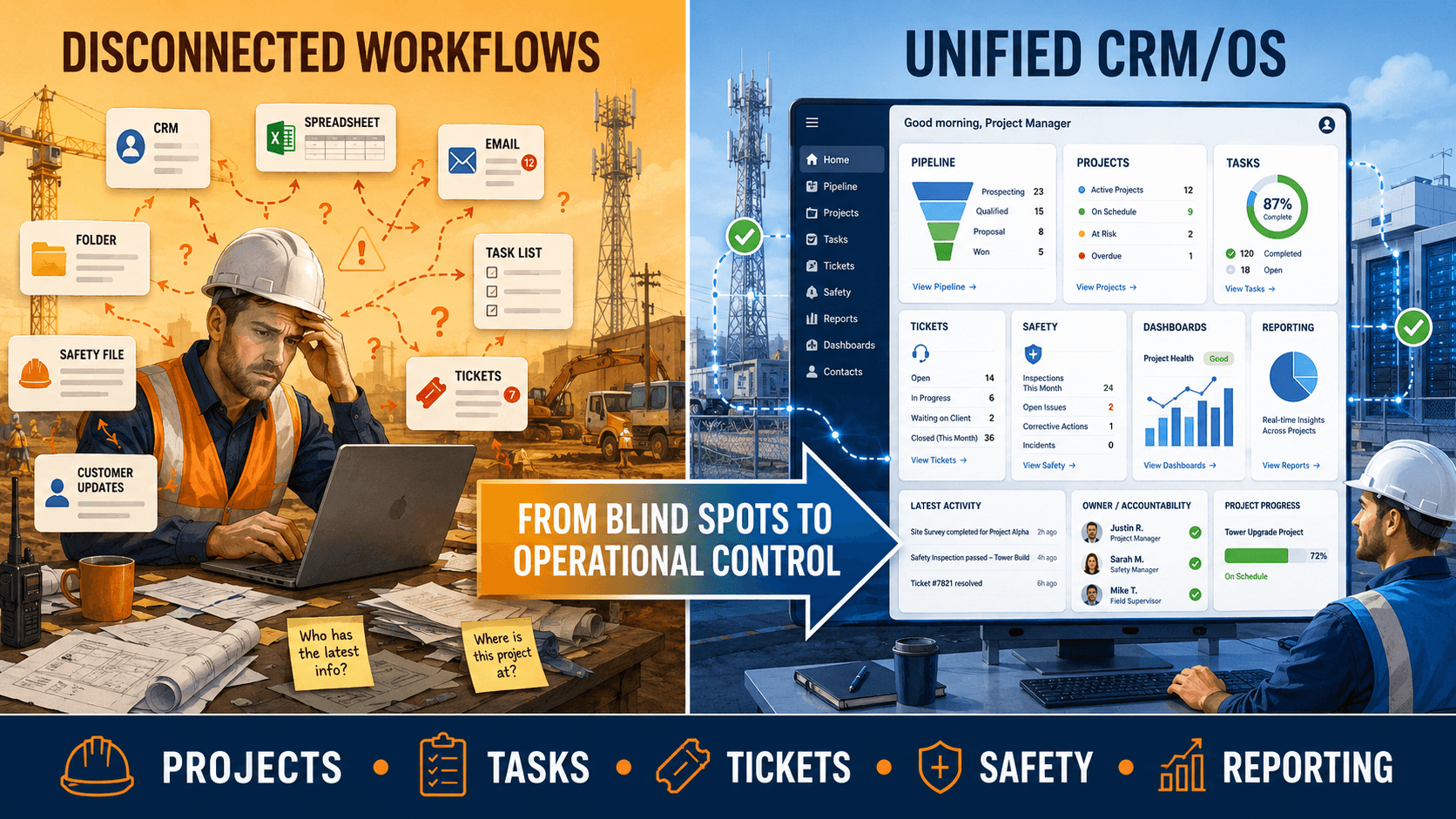
The Problem with Disconnected Construction Workflows
Construction work depends on timing.
The right team needs the right information before work begins. Project managers need visibility into what has been completed, what still needs review, and what may affect the schedule. Safety teams need access to site requirements and job hazard information. Operations leaders need reporting that shows progress across the project lifecycle.
When those details are spread across separate systems, teams spend more time chasing updates than managing the work.
A simple question can become a long search.
- What stage is this project in?
- Who owns the next task?
- Has the site safety information been reviewed?
- Are there open tickets tied to this customer or project?
- Is the project still moving through the pipeline, or has it stalled?
If the answers are scattered, decision-making slows down.
Construction teams do not need more disconnected updates. They need one operational view that connects the work from lead to completion.
Start With the Project Pipeline
Managing construction projects in Unify CRM/OS begins with visibility in the pipeline.
A strong project pipeline helps teams understand where work stands before it reaches the field. Leads, opportunities, bids, RFPs, and active projects can be tracked with more structure, giving teams a clearer path from customer relationship to project delivery.
This matters because construction work often begins long before crews are scheduled. Customer communication, scope details, pricing, documentation, approvals, and internal handoffs all shape how smoothly a project moves forward.
When project and pipeline information live in the same environment, teams can see what is coming, what is active, and what requires follow-up.
That visibility helps reduce missed handoffs.
It also gives leaders a stronger view of future workload, project timing, and operational demand.
Keep Tasks, Tickets, and Project Activity Connected
A project plan is only useful if the work behind it stays organized.
Unify CRM/OS helps teams manage tasks, tickets, workflows, and project updates in a centralized environment. This makes it easier to assign ownership, track progress, and keep action items connected to the customer or project they support.
That connection is important.
A task without project context is easy to miss. A ticket without ownership can sit unresolved. A field issue without visibility can slow down the schedule. A customer update without a clear record can create confusion across teams.
When tasks and tickets are connected to project activity, the work becomes easier to manage.
Project managers can identify what needs attention. Operations teams can see where issues are growing. Leadership can understand performance without relying on scattered updates.
The goal is not just to document activity.
The goal is to make the next action clear.
Manage Safety and Job Hazard Information Earlier
Safety is not separate from construction management.
It is part of the project.
Job hazard information, site requirements, safety documentation, and construction operations need to be visible before work reaches the field. If safety details are managed in separate files or communicated after the fact, teams increase the risk of delays, rework, and compliance gaps.
Unify CRM/OS supports safety and construction management by helping teams organize job hazards, safety site requirements, and related operational information in one place.
That gives project leaders better visibility into safety requirements before they become field issues.
It also helps teams move from reactive safety management to a more structured approach. Instead of waiting for someone to ask whether a document exists or whether a site requirement has been reviewed, teams can manage those details as part of the project workflow.
Better safety visibility creates better project control.
Use Dashboards to See What Needs Attention
Construction leaders do not need more data for the sake of data.
They need information they can act on.
Advanced reporting dashboards in Unify CRM/OS help teams monitor project performance, workflow activity, task progress, ticket status, and operational trends. This gives managers and leadership a clearer view of what is happening across the business.
Dashboards matter because construction issues often start small.
A delayed task. An unresolved ticket. A missing safety step. A project stuck in the same stage too long. A customer update that never reaches the right person.
When teams can see these signals earlier, they can respond before the issue becomes larger.
That is the difference between reporting and operational visibility.
Reporting tells teams what happened.
Operational visibility helps teams understand what needs attention now.
Build Workflows That Match the Way the Business Operates
No two construction organizations manage work exactly the same way.
Some need detailed project approval steps. Others need stronger task routing, safety review, ticket escalation, pipeline tracking, or customer communication workflows. The system should support the way the organization operates, not force teams into disconnected workarounds.
Unify CRM/OS supports workflow management and advanced process flows, giving organizations a more structured way to manage how work moves through the business.
That structure matters.
When processes are clear, teams know what happens next. When ownership is visible, accountability improves. When records, tasks, tickets, and project activity are connected, work becomes easier to manage from start to finish.
This is where Unify CRM/OS becomes more than a project tracking tool.
It becomes an operating system for managing information, workflows, and decisions behind construction projects.
Connect Operations Across the Business
Construction project management does not happen in isolation.
Projects connect to customers, companies, contacts, tasks, invoices, inventory, products, meetings, emails, calls, tickets, and reporting. When those pieces sit in different systems, teams lose the full picture.
Unify CRM/OS brings those functions closer together.
That connected approach helps organizations manage projects with more context. Project teams can understand the customer relationship, track operational activity, monitor safety requirements, manage tasks, and review reporting from a more unified environment.
For telecommunications, utility, and data center construction, that level of connection is critical.
The work is too complex for disconnected systems.
The teams are too busy for manual updates.
The risks are too high for blind spots.
Takeaway
Managing construction projects is no longer just about tracking schedules.
It is about managing the flow of information across customers, projects, tasks, tickets, safety requirements, workflows, and reporting.
Unify CRM/OS gives construction teams a more connected way to manage that complexity. It helps turn scattered activity into organized project visibility, giving teams the structure they need to make faster decisions and manage work with greater control.
Construction teams do not need more noise.
They need one clearer view of the work.
That is how projects move with fewer blind spots, stronger accountability, and better operational control.